
A WhatsApp musical instrument shop in Lebanon runs smoother when every instrument and accessory has a clear place on the store. Customers find what they need faster, and you spend less time asking which model or which strings they mean.
How to Organize Instruments and Accessories
Grouping instruments and accessories by type is essential for a WhatsApp musical instrument shop in Lebanon. Here is a simple way to structure your store:
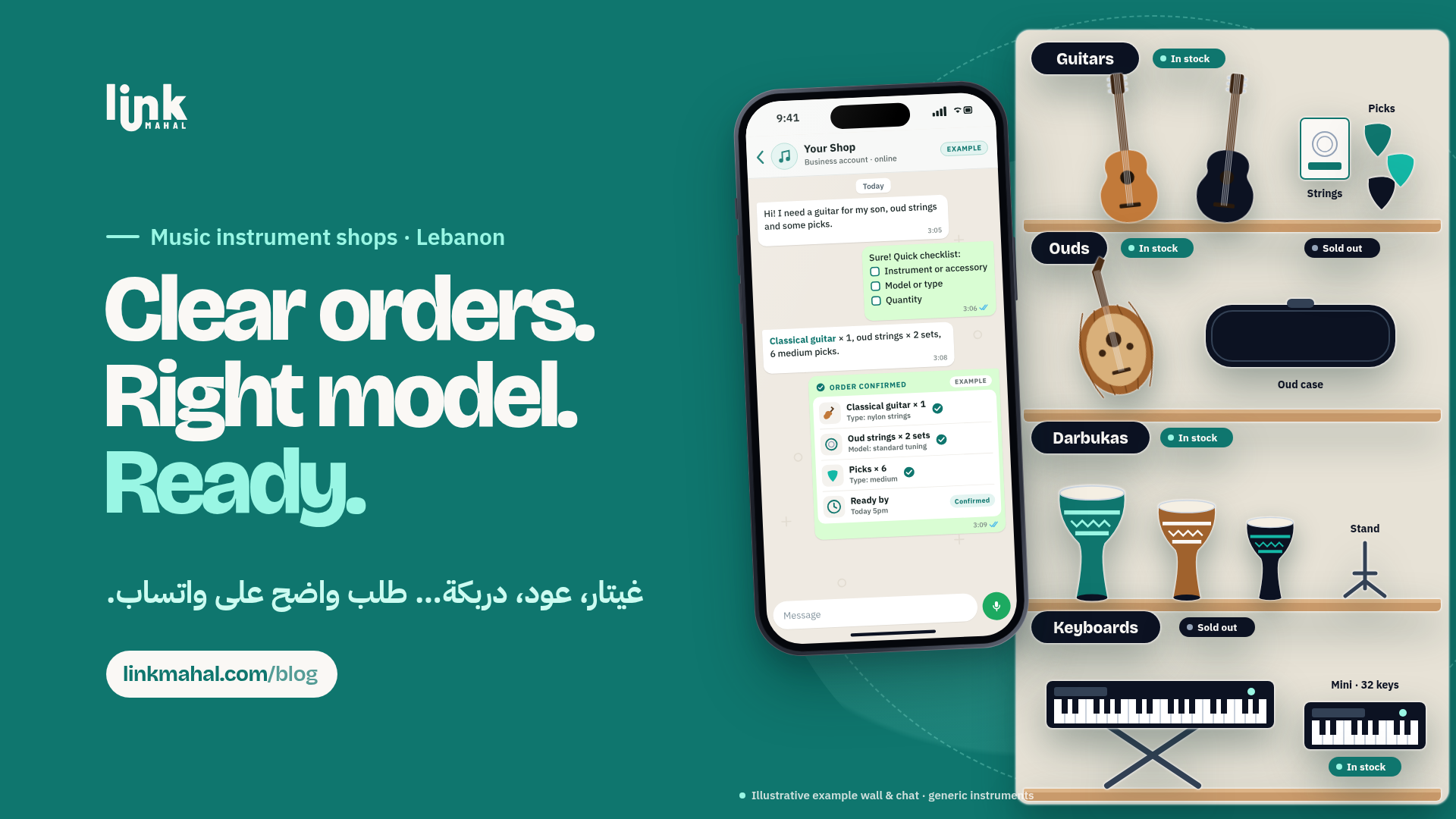
- Instruments: Guitars, Ouds, Darbukas, Keyboards
- Accessories: Strings, Picks, Stands, Cases
Inside each instrument category, list the accessories that fit it. For instance, someone looking for oud strings should find them next to the ouds, with a short note on which instrument they fit. Customers then order the right accessory the first time instead of asking whether it fits.
Highlighting Stock Availability
Show which items are in stock on each listing of your Link Mahal store, and mark sold-out items as soon as they run out. A hypothetical stock view might look like this:
- Acoustic guitar, full size (In Stock)
- Oud, standard size (Sold Out)
- Darbuka, medium (In Stock)
When stock is visible, customers can pick an available option instead of messaging to ask about an item you no longer have.
Creating a WhatsApp Order Checklist
A short order checklist helps you get every detail in the first message. It could include:
- Instrument or Accessory: Specify if it’s a guitar, oud, or a specific accessory.
- Model or Type: For instance, acoustic or classical guitar, or the string gauge they use.
- Quantity: How many units they want to order.
A hypothetical example: a customer sends "Classical guitar strings, normal tension, quantity 2." With the item, type and quantity in one message, you can check stock before you confirm.
Confirming Orders in a Clear Message
Once you receive an order, it’s essential to confirm it in one clear message. This puts every detail in one place for both of you. A hypothetical confirmation might look like this:
"Thank you for your order! You asked for 2 sets of classical guitar strings, normal tension. They will be ready by Friday at 3 PM."
This message confirms their request and informs them about when they can expect their order to be ready.
Sharing a Ready-By Time
Give a specific time for when the order will be ready, and be realistic about it. For example, if an instrument needs a setup or a day or two to come in, say so early. Doing so sets the right expectations and helps reduce follow-up messages asking for updates.
A message could state: “Your order will be ready by Friday at 3 PM. Thank you for your patience!” This gives customers a clear timeline from the start.
Set Up Instrument and Accessory Categories on Link Mahal
With Link Mahal, you can create a category for each instrument on your own online store, list the accessories that fit it, mark sold-out items, and receive orders on WhatsApp with the item, type and quantity already filled in. Start with the free Starter plan (up to 10 products) and move to Pro or Enterprise as your range grows. Create your store.